 Fra Noi Embrace Your Inner Italian



The theme for most of my columns this year has been “some of this is great, and some of this is bad and needs very thorough review.” This month is no exception!
After attending a conference in McHenry recently, I was asked about my experience with “THE Family Tree. … Not “My Family Tree,” but “THE Family Tree.”
Well, my favorite website, familysearch.org, has been asking everyone to contribute their research to something called “THE Family Tree.” I will be the first to admit that I do not know all that much about how “the” family tree functions. I have not contributed much to it, but I have used it to great personal advantage. I’ll explain.
Familysearch, Ancestry and other sites have asked people to upload their genealogy work to their sites, and then allow others to search that work in order to assist them in their own research. You can find multiple people with similar trees with different data, but it’s difficult to know who to trust.
FamilySearch decided to make a single family tree combining everyone’s information. That way there shouldn’t be duplications, and people can settle disagreements about information in THE Tree. Sounds democratic with a small “d,” doesn’t it?
The idea is that you download your tree from your computer into a gedcom file (check your software manual or web site for how to do this) and upload it to “the” tree.
Familysearch will check every person in your tree to see if there is an exact, partial match, or a pretty vague match, and ask you if you want to merge a person from your tree with a person in “the” tree.
What if you have Filippo Giacomo Carbonara, born July 8, 1832, in Triggiano, Bari, with no death information and “the” tree has a Filippo Carbonara born in 1832, died Sept. 9, 1883 in Capurso, Bari. Is this a match? It’s hard to tell from the information above. It could be two different Filippo Carbonaras, even though the towns are nearby. You may have to say, “No this is not a match” and go on.
If you have a lot of people in THE Tree, this process could be extremely long.
What happens if you merge the two Filippo Carbonaras and then do some checking to find they aren’t the same person? It’s a hassle to “unmerge” a person who was merged already.
The good news is that the screen to merge two people into one person shows everything you need to know to decide if they are the same. You can see parents of both, spouses of both, dates of birth, marriage and death of both. If everything looks the same, you can merge with confidence. If not, it is best to wait and do some more checking.
One thing to note: THE Tree does not contain living people with information. If you are the person who submitted a name, such as a parent who is still living, you will be able to see that record when you log into FamilySearch, but no one else can, because that person will be marked “living.” If that person passes away, and you mark them “deceased” in THE Tree, they will be searchable to anyone.
Due to the number of people in my tree, I have only contributed a small number of ancestral families, rather than the thousands of people connected to my file.
However, anyone with a FamilySearch login can search THE Tree. That is what I have been doing for the past couple of weeks.
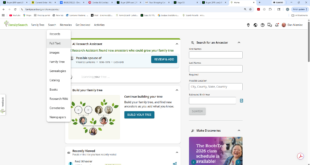
When you get into FamilySearch, you can click “Search and then click “Family Tree.”
There is also a section called “Genealogies.” What is the difference? Well, the genealogies were submitted a long time ago, before THE Tree was created. This data is not mergeable or changeable. In many instances, the person who submitted the trees to the genealogies section are now deceased themselves, so you cannot ask for help with a particular person.
Let’s try a search in THE Tree. My usual method is to search for a name, and then search for either the parents OR the spouse of that person. This will narrow down my search to the person I wanted, I hope!
Please keep in mind a couple of things when you try this. First, at this writing, there are about 1.67 billion (with a b) names in THE Tree, despite trying to merge people together to eliminate duplicates. Second, the search gives you lots of hits that get progressively less likely to be yours. But do not be scared when your search comes up with 60,000 hits. It works very well finding the closest matches based on the data you searched with.
The results show you parents and/or spouse(s) and/or children of the person you searched for. They then show you the connected parents/spouses/children to the right. Note: They don’t show all children all the time. Sometimes they don’t show any children, but that does not mean there are no children in that search result. Take a look at this result screen:
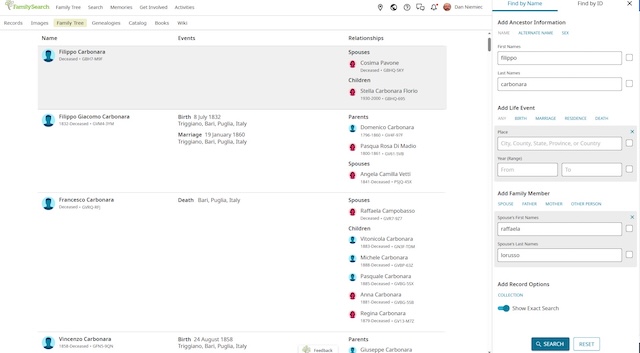
If there are only 1-2 kids, they are in the right as connected to the Filippo Carbonara on the left. Others show parents and a spouse but no kids. Most often, if the parents are connected, the kids aren’t shown in the search result.
However, if you click on one of the Filippo Carbonaras on the left (or one of the parents/spouses/children on the right) the first thing you will see is a snapshot of that person’s record.

Under the name is a unique identifier for that record containing letters and numbers. This may help you find a specific person again later rather than searching the other way.
You then have a few things you can click to move forward.
click the star to “follow” this record. Any changes that anyone makes to this person will end up sending you a notification that a change was made.
click the “box with a line to another box” to see how you and this person are related. This requires that you have enough of YOUR tree uploaded into THE Tree to trace up and down to connect you with the person you clicked.
You can click on “Person” to get to the person’s record and all the details.
You can click on Tree to see where this person fits into THE Tree. Typically you would see a few generations.

You can click on anyone on THE TREE screen to see some details to the right. You can click “children v” to see all known children of this couple. You can click to see the known parents of the couple next to the symbol.
To the right, there is usually “Landscape” but you can click that and see more options:

Portrait will show you the same tree in upright format.
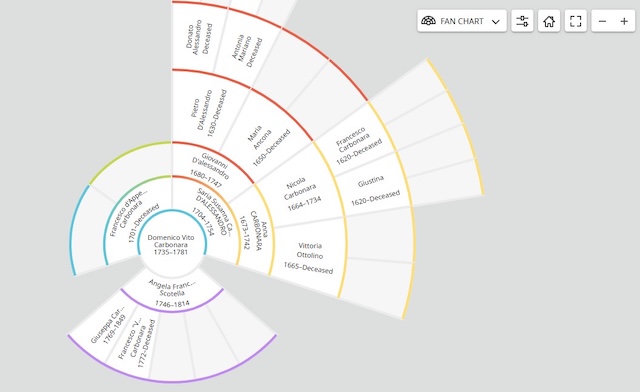
Fan chart will show you an ancestor chart from the person you selected, fanned out so you can see what lines need the most help.
“Descendancy” shows a text chart starting at the person you clicked, and working toward the present.

Lastly “First Ancestor,” well, even I don’t understand how this works spo let’s skip it for now.
All the tree manipulation is cool but I want to typically look at the person’s data, so I usually click “Person.”
There is a LOT of info on each person’s page, so here is Filippo’s page below:
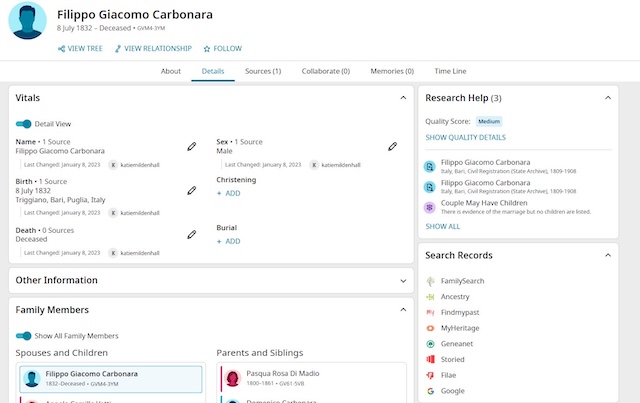


I’m going to just do a few basics here, so you get the best advantage from the site.
When you see a pencil next to a piece of data, it means “edit.”
Click the pencil for you to edit the data itself, or to add a source.
When you edit a piece of data, FamilySearch asks you why. This is so the reason you changed someone else’s data can be explained to them (remember the “follow star?) When the other person sees the change, and decides that your change is completely off base, they can change it back and explain why. This sounds like two people can get into a debate about one piece of data in this gigantic tree. Yes, that’s exactly how it works!

You can see the last person who changed that piece of data, and click on their name. This will open a small box showing the person, and ways to contact them (e-mail or FamilySearch chat).
Below the birth, christening, marriage, death and burial information, there is a section for the other family members, including known parents, siblings, spouses and children. This is the best place for you to decide if this person is really the one you want to work with.
I also like to the bottom right as y9ou scroll down this page. “Print Options.”

You can print some of the details in different ways.
Person Details – prints the person details and various relatives on one printout (they’re all PDF files)
Pedigree – prints several generations of ancestors in a standard pedigree chart
Portrait Pedigree – prints a graphical tree of several generations.
Fan chart – see above
Family Group Record – this just shows the details of the person, their spouse, and their children – I like this one – the other printouts don’t always show the birth death and marriage dates.
Family Group Record with Sources – this one goes on and on depending on how many FamilySearch records have been linked to people in THE Tree. It is a very good place to check the data and verify if the other genealogists who edited this record are doing a good job.
There is now way one column can explain all the details of how to use THE Family Tree but I hope it has pushed you into checking it out. There are classes around the Chicago area that explain in more detail so keep your eyes open for them at your local library or genealogy group.